
I’ve been looking at having iCal (the calendar app on Mac OS X) to help me inject some order into my schedule. In life, at the very least, you need to have a basic “to do” list, a schedule, and a budget. iCal takes care of two out of those three. Not bad for a start.
While it’s a simple matter of entering in items into my schedule, what’s a realistic way to enforce adherence to that schedule? On the face of it, it seems simple – just keep on referring to your calendar every now and then. But I believe a ‘push’ model would work better than a ‘pull’ model here; it would be awesome to have your calendar tell you what to do when it needs to get done!
iCal has e-mail options which enables it to e-mail you about upcoming events and scheduled items, but it does not take advantage of text-to-speech for some reason. So here’s a little Applescript to add that functionality. Calling this script on the event will read out (in the default MacOS ‘Alex’ voice) your event, in this format:
Attention! It’s 10 o’clock. Time to Sell Nesco shares.
This is assuming my event was ‘Sell Nesco shares‘, and scheduled at ten.
(Statutory disclaimer: This is not stock advice, and the author has interest in Nesco shares)
Without further ado, here’s the code:
set Now to current date
set Earlier to (current date) - (0.1 * hours)
set Later to (current date) + (0.1 * hours)
tell application "iCal"
set AllCalendars to every calendar
repeat with EachCalendar in AllCalendars
set CalendarName to name of EachCalendar
tell calendar CalendarName
-- just change the above line if you want to 'say' events from one calendar only
repeat with thisEvent in (every event whose start date is greater than Earlier and start date is less than Later)
-- or (start date is MidnightToday and allday event is true)) Â Â Â Â Â Â Â Â Â
--say ""
-- say CalendarName
if contents of thisEvent is not missing value then
set TheEvent to contents of thisEvent
set EventProperties to properties of thisEvent
set EventName to summary of EventProperties
set EventLocation to location of EventProperties
set EventDescription to description of EventProperties
set EventStartDate to start date of EventProperties
--say (time string of (current date))
set {hours:hr, minutes:mn, seconds:sc} to current date
set SpokenTime to "Attention! It's "
set SpokenTime to SpokenTime & hr & ":" & mn
say SpokenTime
-- say mn
set SpokenEvent to "Time to "
set SpokenEvent to SpokenEvent & EventName
say SpokenEvent
end if
end repeat
end tell
end repeat
end tell
To use this script, open up Script Editor from Applications/Applescript. Paste the script in and save it to a good location. Apple recommends /home/library/scripts, I believe.
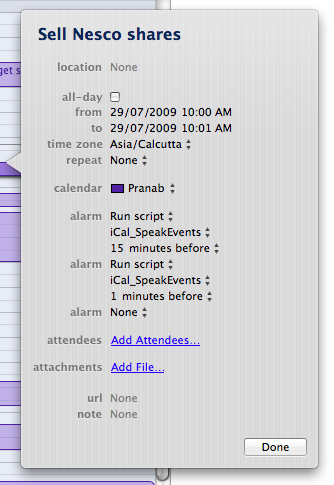
While adding or editing the event you want to be spoken out, you can now choose Run Script as your alarm, and point to the script you just saved. here you can see my own screenshot, where I’ve saved the script as iCal_SpeakEvents.
Suggest modifications in the comments below!
I tried this script and it worked well but it fails to repeat any events that are scheduled to repeat at a regular interval. I wondered if you have any idea how this could be changed? I’m not very good at scripting things as you can guess. Thanks for any help.